SAFETY & COMPLIANCE PLATFORM FOR CONTRACTORS
Non-Compliant Workers Don't Get On Your Site.
ClearWorkers verifies certs and orientation at the gate, writes JHAs with AI, and files everything to Procore — flat price, never per worker.
- Free plan — no card required
- Set up in a day
- Pushes to Procore

FROM THE FIELD
“First morning with the kiosk, it caught two guys whose fit-test had lapsed. That used to be a citation waiting to happen.”
“JHAs that took my foremen half an hour now take a sentence. And they actually get signed.”
“Our GC asked for our safety record on a Friday. I sent a link instead of a banker's box.”
06:45 — AT THE GATE
Compliance Enforcement Starts at the Gate
A worker scans the QR code on their hardhat at the site kiosk. In one scan, ClearWorkers:
- Verifies every required certification is current
- Confirms site orientation is complete — and blocks check-in if it isn't
- Records attendance with a timestamp
- Automatically adds them as a signatory on every active JHA for that job, that day
- Updates the on-site headcount your superintendent sees
Green means cleared. Red means they don't get on your site. No supervisor judgment calls, no paper sign-in sheet, no “I'll send my card later.”
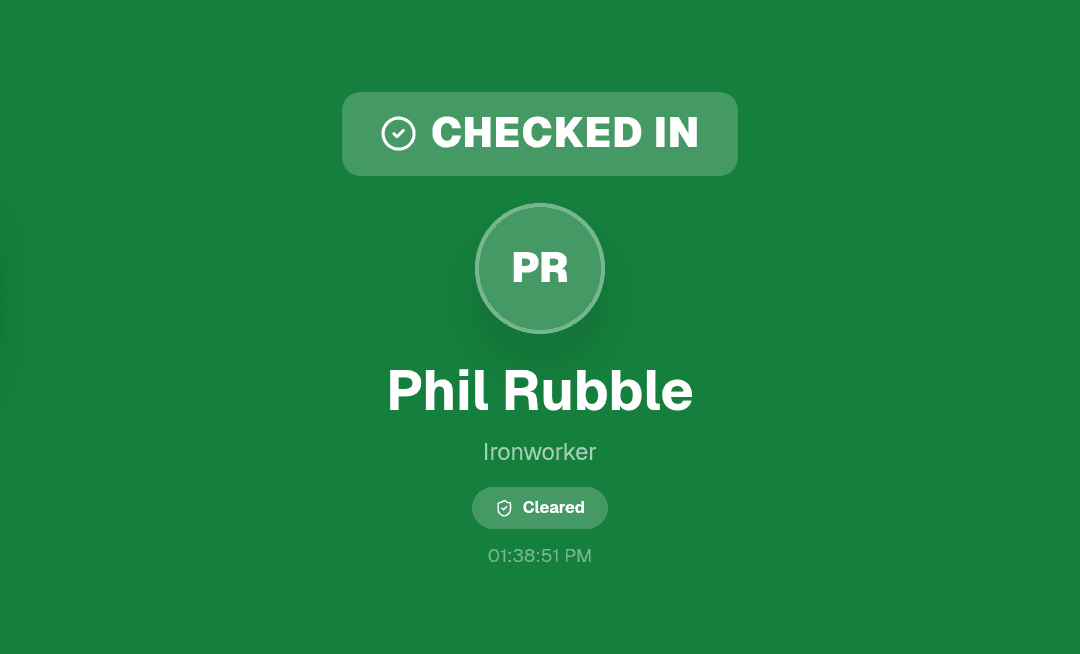
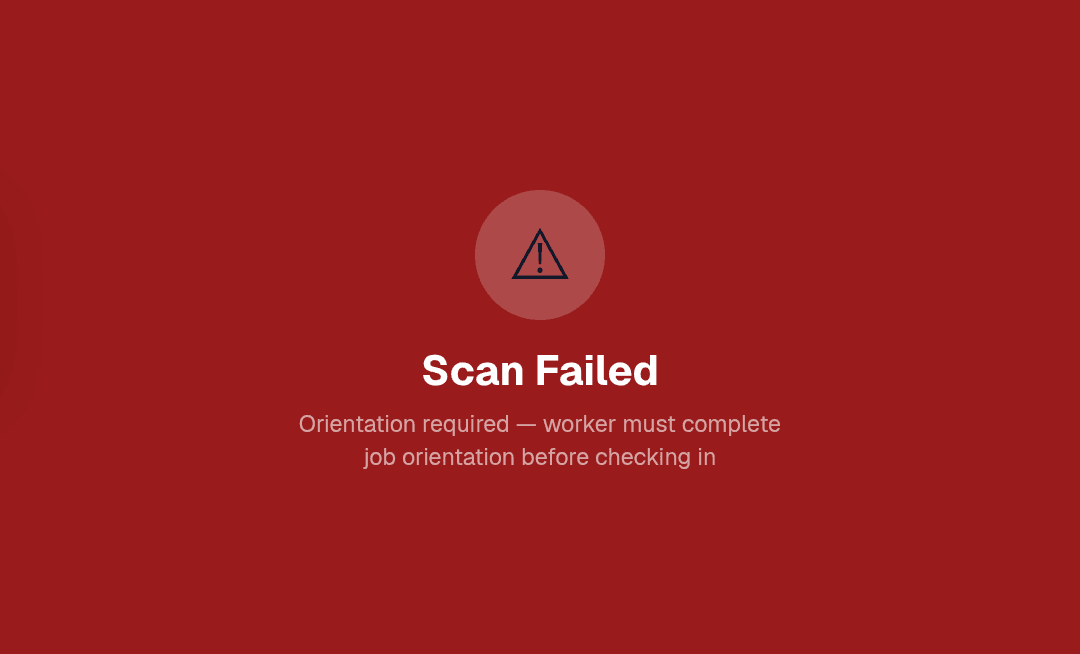
Workers without a current cert or a passed orientation see a red screen — not your jobsite.
07:00 — BEFORE WORK BEGINS
Describe the Work. Get Complete JHAs in Seconds.
Type what your crews are doing today, in plain English:
“Trenching and installing underground conduit in Area A, setting equipment in Building B.”
ClearWorkers AI:
- 1Identifies each distinct work area
- 2Asks 3–5 sharp clarifying questions — energized equipment nearby? elevation over 4 feet? confined space?
- 3Generates one complete JHA per work area: steps, hazards, controls, PPE, and tools
These aren't generic templates. The hazards, controls, and PPE come from your description of the actual work — heights trigger fall protection, energized work triggers arc flash controls, confined spaces trigger entry protocol.
Then the loop closes itself: workers who checked in that morning are already on the signature list. They scan a QR, sign on their phone, done. Export the signed PDF or push it straight to Procore.
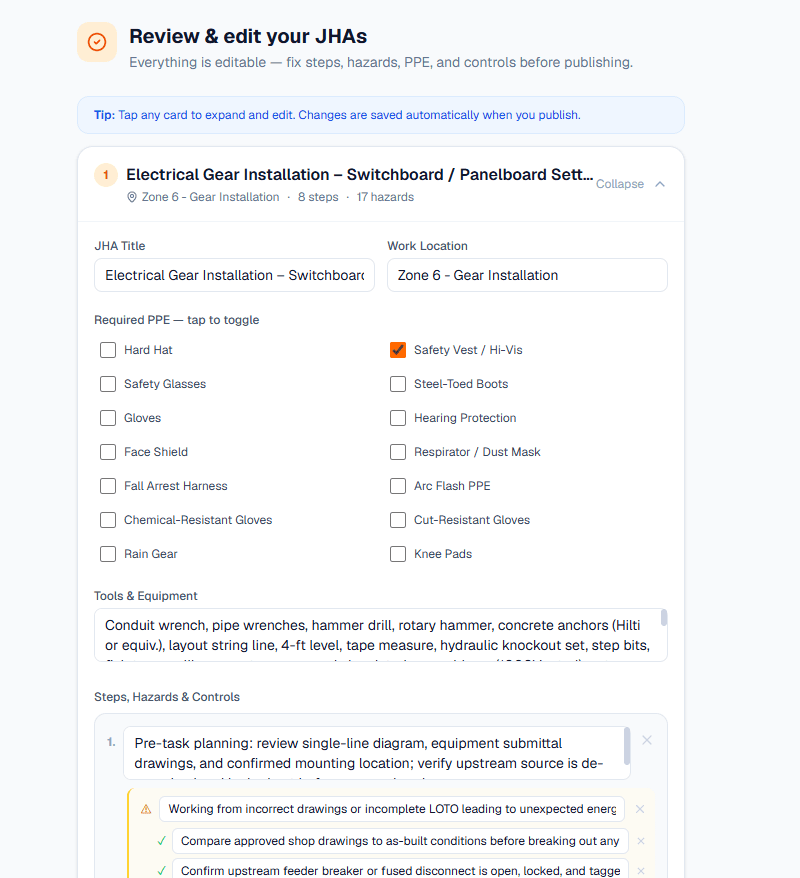
What took a foreman 30 minutes of copy-pasting now takes one sentence and a review.
Want to see it generate a JHA for your actual scope of work? Book a 20-minute demo →
ALWAYS ON — THE RECORD
Never Get Caught With an Expired Cert Again
- Upload a cert PDF — AI reads it and fills in the dates for you
- Bulk upload up to 50 documents at once and triage them in a side-by-side review grid
- Every worker carries a live compliance badge: green (cleared), yellow (expiring within 30 days), red (not cleared)
- A 6-month expiry calendar shows exactly what's coming due
- Admins get automatic expiry reminder digests — before it becomes a problem at the gate
Workers get their own portal (magic link, no password) where they can see their status and upload their own documents.
COMPLIANCE BADGES
CERTS EXPIRING — NEXT 6 MONTHS
ALL DAY — IN THE FIELD
Every Inspection, Every Incident, One Paper Trail
Equipment Inspections
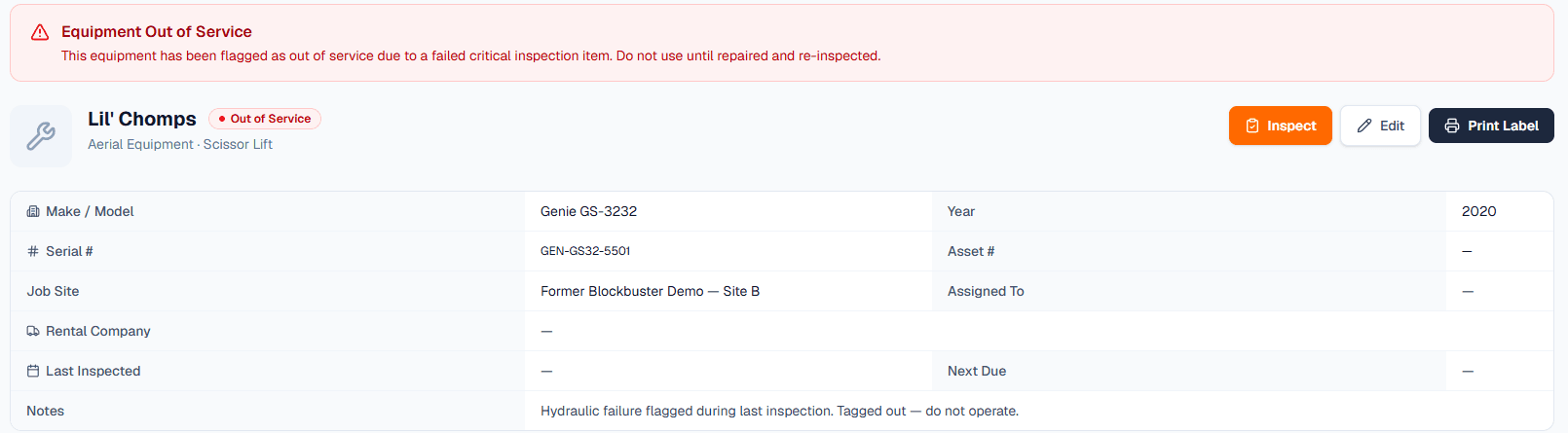
Scan the QR label on any lift, generator, or tool. Run the pre-use checklist on your phone — no login needed. A failed inspection automatically takes the equipment out of service and alerts the dashboard.
Scissor Lift #SL-204 — failed pre-use 06/09
Incident Reporting
File near misses through recordables with full OSHA fields, photos, and root-cause investigation. Every new incident emails your admins instantly.
Case 2026-014 — investigation open
OSHA 300 Log — Automatic
Your federally required annual injury log generates itself from your incident records. Case-numbered, formatted, exportable as PDF or CSV. No more year-end scramble.
OSHA-300-2026.pdf · OSHA-300-2026.csv
END OF DAY — FILED
Your Safety Records, Filed in Procore Automatically
Connect once. Then:
- Import your active Procore projects and project directories — workers and jobs created in one click, deduplicated
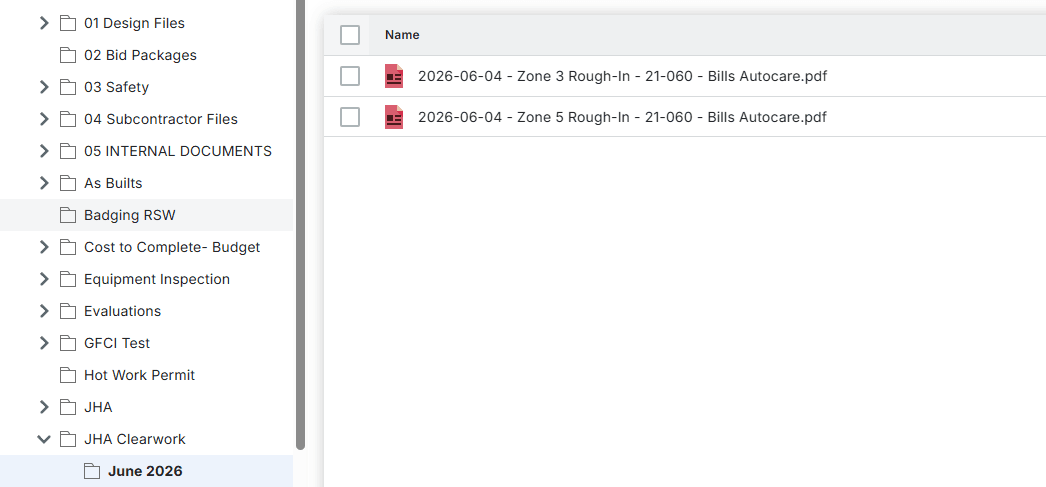
- Push signed JHAs, failed equipment inspections, safety walks, and incident reports as PDFs into organized, month-by-month Procore folders
- Incidents also create a Safety Observationrecord in Procore's Incidents module
Your PMs keep living in Procore. Your safety data shows up there anyway.
Run Procore? Book a 20-minute demo →
MONDAY 07:00 — THE REPORT
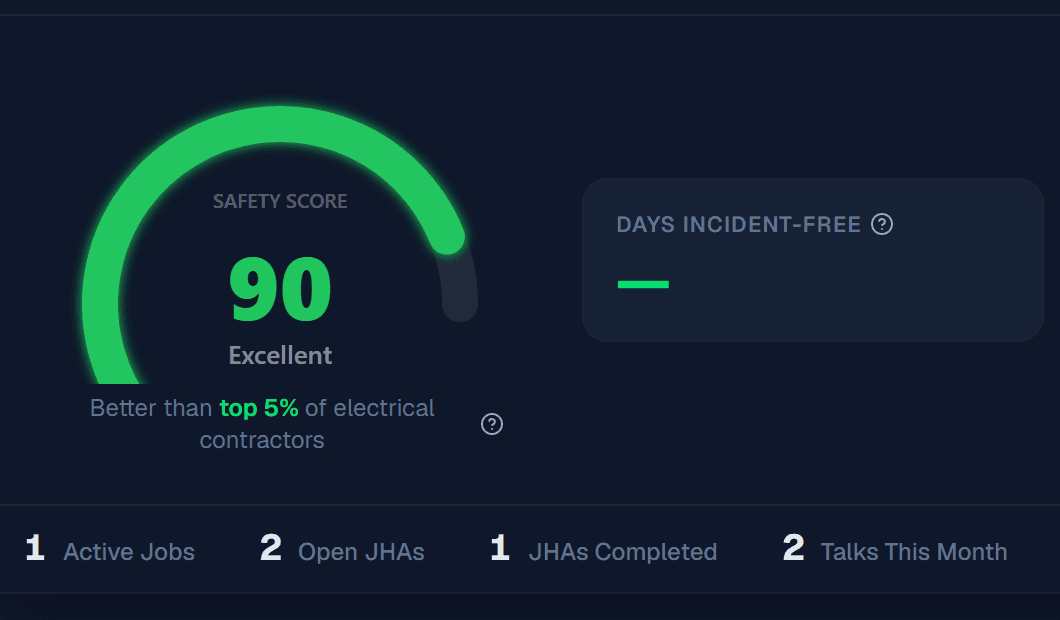
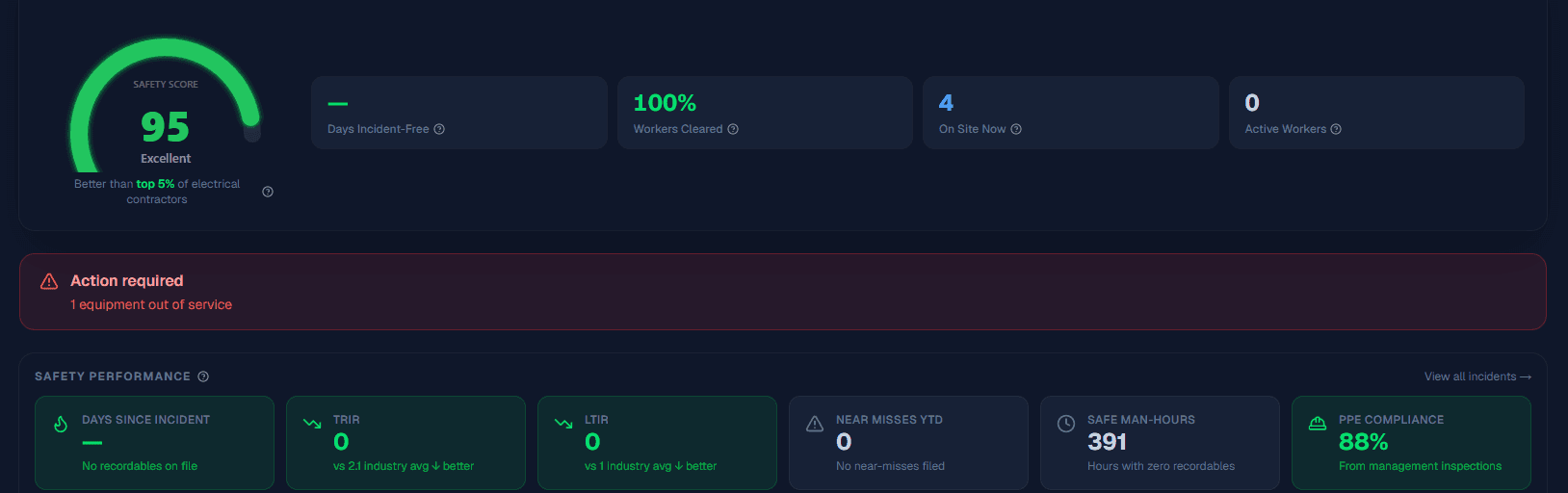
One Score Tells You How Safe Your Company Is
The ClearWorkers dashboard distills everything into numbers leadership actually reads:
- Company Safety Score (0–100) — built from your TRIR, LTIR, days incident-free, cert compliance, open corrective actions, and PPE compliance
- Job Risk Scoreboard — every active job scored and color-coded, so you know which site needs attention today
- Issues Panel — expired certs, overdue inspections, open corrective actions, out-of-service equipment — each one clickable, each one current
Every Monday, a Weekly Safety Digestlands in your admins' inboxes automatically: who's on site, what's expiring, what happened last week, what's still open.
EVERY SUB — ACCOUNTED FOR
Subs Manage Their Own Compliance — You Just See the Results
Invite a subcontractor by email. Their admin gets their own portal where they upload their workers and keep certs current — and they see only their own people, never another sub's data.
You see every sub's compliance status rolled into your job rosters and dashboards. GCs can get read-only access to your safety record when they ask for it — which they will.
SUBCONTRACTOR COMPLIANCE — RIDGELINE PLAZA
- Apex Electric14 workers · 93% cleared
- Marquez Concrete22 workers · 100% cleared
- TruNorth Mechanical9 workers · 78% cleared
STRAIGHT ANSWERS
Questions Superintendents Actually Ask
Do workers need to download an app?
No. Workers scan the QR code on their hardhat at the site kiosk — nothing to install. When they need to sign a JHA or check their cert status, they get a magic link on their phone. No app, no password.
What if there's no wifi at the gate?
The kiosk runs on any tablet with a connection — jobsite wifi, a hotspot from the trailer, or a tablet with its own data plan. The pre-configured kiosk package we sell uses a rugged Samsung tablet that supports cellular data.
How long does setup take?
Most companies are checking workers in the same day. Import your workers from a CSV or straight from Procore, print QR labels onto Avery stickers, and stand the kiosk up at the gate.
What happens when a sub's worker shows up non-compliant at 6 a.m.?
They scan, the screen goes red, and check-in is blocked. The kiosk shows exactly why — expired cert or missing orientation. Fix it on the spot (upload the cert, run the orientation on their phone) and they rescan. No supervisor judgment calls.
Do I have to buy hardware?
No. The kiosk is software — any tablet can run it, and the Free plan prints QR labels onto Avery 2″×2″ waterproof stickers from any office printer. The $999 kiosk package is for teams that want it turnkey: rugged tablet, locking stand, and hands-free scanner, configured before it ships.
What does it cost as we grow?
Flat monthly pricing — $149 or $499 depending on the plan, never per worker. Adding your 51st worker costs the same as your first.
PRICING
Start Free. Grow When You're Ready.
Free
$0forever
- 1 job · 10 workers · 10 equipment
- 10 JHAs · 5 toolbox talks
- 1 subcontractor · 1 kiosk
- QR check-in at the gate
- QR labels on Avery 2″×2″ stickers
- OSHA-ready incident reports
Starter
$149/month
or $1,490/yr — 2 months free
- 5 jobs · 50 workers · 50 equipment
- Unlimited JHAs & toolbox talks
- 5 subs · 3 kiosks
- AI JHA Generation — 10/month
- Bluetooth label printing (REEKON P1L)
- OSHA 300 log
Pro
$499/month
or $4,990/yr — 2 months free
- Unlimited jobs, workers & equipment
- Unlimited AI JHA Generation
- Unlimited subs & kiosks
- Bulk import — CSV + Procore
- 50-cert AI triage
- Full Procore integration
Flat monthly pricing — never per worker. Less than the cost of one OSHA citation. Need the gate hardware? Kiosks & printers →
BOOK A DEMO
See It Work Before Your Next Pour
Twenty minutes, your jobs and your trades. We'll show the gate check-in, generate a JHA from one sentence, and push it to Procore — live.
Prefer email? sales@clearworkers.com
Stop Managing Safety in Five Different Places
Spreadsheets for certs. Paper for sign-ins. Binders for JHAs. Email for incidents. Procore for everything else.
ClearWorkers replaces the first four and feeds the fifth.